What is a purchase order?
A purchase order (PO) is a document a buyer sends a vendor to request goods or services at agreed prices and terms. It lists the items, quantities, unit prices, delivery details and a PO number. Once the vendor accepts it, the PO records what was ordered, so the vendor's invoice can be matched against it later.
Get the free purchase order template
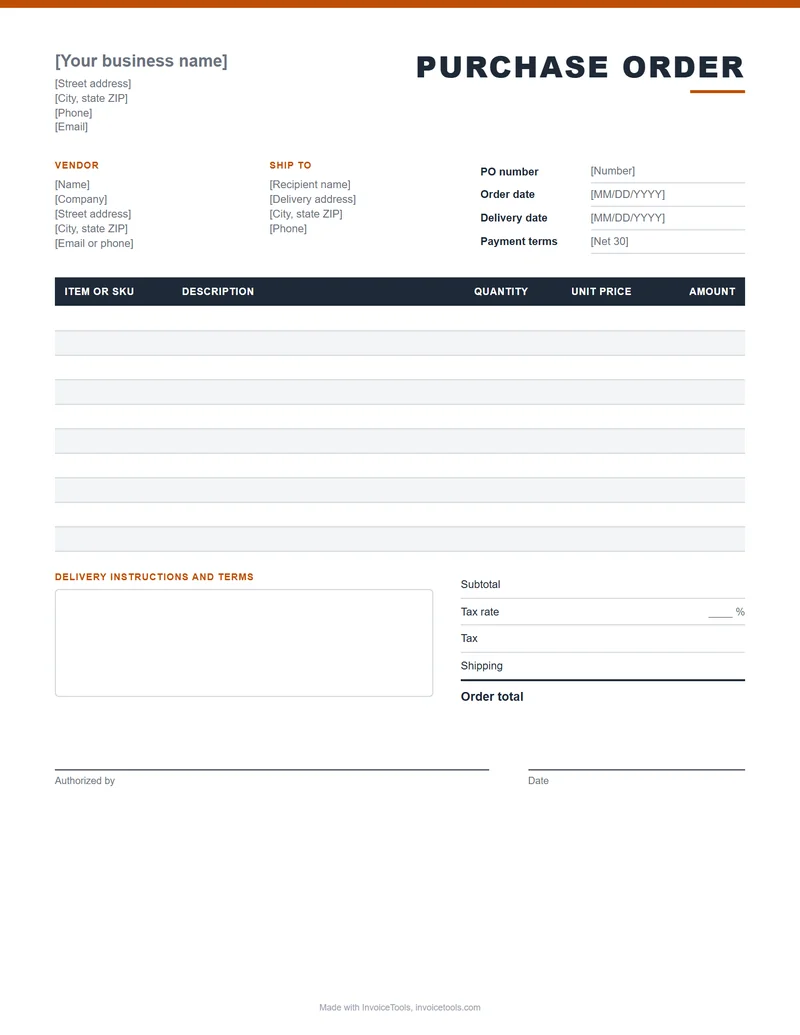
The blank template has a buyer block, vendor and ship to blocks, PO number, order and delivery dates, payment terms, ten item rows with SKU, tax, shipping, an order total, delivery instructions and an authorized by line. In the Excel file the line amounts, subtotal, tax and total calculate for you.
Prefer not to edit a file? The purchase order generator builds the same document as you type and saves it as a PDF. Downloads need no account.
What to include on a purchase order
Every purchase order should answer the same questions for the vendor: who is ordering, what exactly, how much, where it goes and when, and who approved it. These are the fields the template covers.
| Field | What to enter | Why it matters |
|---|---|---|
| Buyer details | Your business name, address, phone and email. | The vendor knows who is ordering and who to contact with questions. |
| PO number | A unique number, such as PO-2026-0042. | Both sides quote it on the invoice, packing slip and payment, so it is the thread that ties them together. |
| Order date | The date you issue the order. | It starts the clock for delivery and payment terms. |
| Vendor | Name, company, address, and an email or phone. | It states exactly who is being asked to supply the goods or services. |
| Ship to | The delivery address and a contact name there. | The delivery address is often different from your billing address. |
| Item or SKU and description | The vendor's item number and a plain description of each line. | It removes guesswork about what is being ordered. |
| Quantity, unit price and amount | How many, the agreed price per unit, and quantity times price. | It locks in the price you agreed, and the invoice should match it. |
| Tax and shipping | The tax rate and any shipping charge, on their own lines. | There are no surprises when the invoice arrives. |
| Delivery date | The date you need the order by. | It sets a clear expectation and a reference point if the order is late. |
| Payment terms | For example Net 30, meaning payment is due 30 days after the invoice date. | It sets when you will pay. See net 30 and payment terms. |
| Delivery instructions | Dock hours, access notes, who signs for the delivery. | It prevents missed deliveries. |
| Authorized by | The name, signature and date of the person who can approve the spend. | Many accounts payable teams will not pay an order without an approval. |
Purchase order example
This fictional order shows a filled in template. Northfield Design Studio orders office furniture from Cedar Ridge Office Supply.
Purchase order PO-2026-0042
| Item | Description | Qty | Unit price | Amount |
|---|---|---|---|---|
| CH-210 | Task chair, mesh back | 6 | $139.00 | $834.00 |
| DK-480 | Standing desk frame, 48 in | 4 | $312.50 | $1,250.00 |
| MA-030 | Single monitor arm | 10 | $44.20 | $442.00 |
| Subtotal | $2,526.00 | |||
| Tax (8%) | $202.08 | |||
| Shipping | $85.00 | |||
| Order total | $2,813.08 | |||
Delivery instructions: call the front desk on arrival. Authorized by: office manager.
The math: 6 chairs at $139.00 is $834.00, 4 desk frames at $312.50 is $1,250.00 and 10 monitor arms at $44.20 is $442.00, for a subtotal of $2,526.00. Tax at 8% is $202.08. Add $85.00 shipping and the order total is $2,813.08. When Cedar Ridge sends its invoice, it should show PO-2026-0042 and the same total.
How to fill in a purchase order
- Add your details and the vendor's. Include the ship to address if it differs from your billing address.
- Give it a PO number. Use a prefix, the year and a running count, then log it.
- List each item. One line per product or service, with the vendor's SKU, quantity and agreed unit price. If you are still pricing the job, the cost estimator can work out what to order first.
- Add tax, shipping and terms. Show them on their own lines, and set the delivery date and payment terms.
- Get it approved, then send it. Sign or record who authorized it, save it as a PDF and email it to the vendor with the PO number in the subject.
Purchase order vs invoice vs quote
These three documents sit at different points in one purchase. A quote offers a price, a purchase order accepts it and orders, and an invoice asks for payment.
| Document | Sent by | When | What it does | Make one |
|---|---|---|---|---|
| Quote | Seller | Before the purchase | Offers a price for described work or goods. | Quote generator |
| Purchase order | Buyer | After agreeing the price | Orders the goods or services and states the terms. | Purchase order generator |
| Invoice | Seller | After delivery or completion | Requests payment and should quote the PO number. | Invoice generator |
The vendor's confirmation and invoice should repeat your PO number. For more on why that number matters, read purchase orders and the PO number.
Purchase order template questions
What is a purchase order?
A purchase order is a document a buyer sends to a vendor to order goods or services. It names the items, quantities, agreed prices, delivery address and date, and carries a unique PO number that both sides quote on later paperwork such as the invoice.
What should a PO number look like?
Use a short prefix, the year and a running count, such as PO-2026-0042. It only has to be unique and easy to find again. Never reuse a number, and keep a simple log so you can see which orders are open.
What is the difference between a purchase order and an invoice?
A purchase order comes from the buyer before the work or delivery and says what they want to buy. An invoice comes from the seller afterward and asks for payment. A good invoice repeats the PO number so the buyer can match the two.
Can I edit this purchase order template?
Yes. The Word and Excel files are editable, and the Excel file calculates each line amount, the subtotal, tax and order total from the quantities and prices you type. The PDF is a blank form to print and fill in by hand. You can also fill in the online purchase order generator and save a PDF.
Is a purchase order legally binding?
A purchase order can form part of a binding contract once the vendor accepts it, for example by confirming the order or shipping the goods. How far it binds either side depends on its terms, any master agreement between you and the vendor, and local law. This is general information, not legal advice, so ask a lawyer about high value orders.
How do I send a purchase order to a vendor?
Save the finished order as a PDF and email it to the vendor's sales or order contact, with the PO number in the subject line. Ask them to confirm receipt and the delivery date, and keep a copy. Some larger vendors want orders submitted through their own portal instead.
Related tools
Build the document online with the purchase order generator. Authorize a job for your own crew or a subcontractor with the work order generator. Work out what a job will cost before you order with the cost estimator.
What this is. A free template and guide written by James Carter. It describes common purchase order practice, not a legal standard, and it is not legal advice. Check any contract terms that matter with a qualified professional.
Last reviewed by InvoiceTools, Houston, Texas, on 3 November 2026.