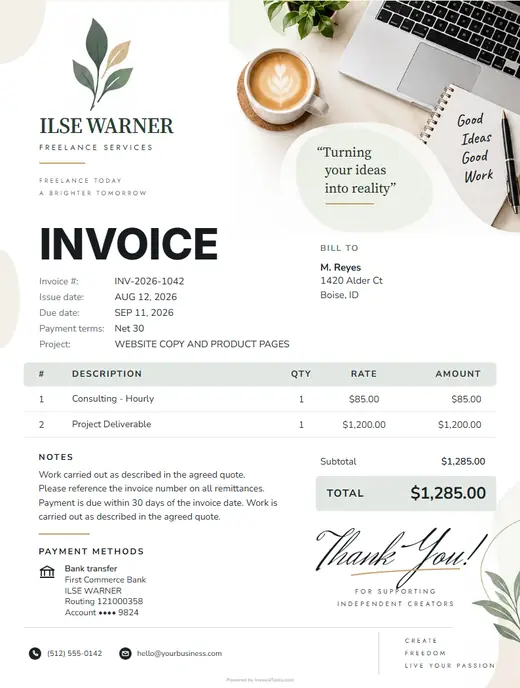

The freelance invoice, sent when the milestone lands
Open the generator and project work, project milestone and the rest of the freelance lines are already on the page. Change the rates, add your logo, export a print-ready PDF.
- Three freelance lines on the page before you type
- Your logo, your colour and your terms on every document
- Print-ready PDF, or send it and see when it is opened
Free, no signup, nothing you type leaves your browser.
Six documents, one set of lines
Every one opens with Freelancer (general) already selected, and a quote converts to an invoice without retyping.
Invoice
Project work billed, with expenses and materials on its own line.
OpenQuote
A price for the project work, held while the client decides.
OpenCost estimate
A number to work to before the scope is settled.
OpenReceipt
Proof the money arrived, issued the day it clears.
OpenWork order
The scope, agreed in writing, no prices shown.
OpenPurchase order
What you buy in for the job, on record.
OpenHow freelancers bill
The generator assumes three things about how the work is billed.
Priced by the hour
Project work bills per hour, and the quantity prints on the document. The client can check what was counted instead of taking one figure on trust.
Materials on their own line
Expenses and materials sits apart from your time. When the supplier price moves, it is a rate edit, not a conversation about your labour.
The last line still gets named
Project milestone goes on the document rather than into a rounding. Work that is not written down is work you are giving away.
What you get, free
Six controls in the generator, each aimed at a part of the week.
Three lines before you type
The last job ends and the invoicing starts, the same lines typed again from memory. Pick Freelancer (general) once and every document here opens with them in place.
The record on the document
The detail that matters later belongs on the document the client keeps, not in a notebook in the van. Add a field, type it once, and it prints.
Photos and a signature
A number on its own gets queried. The work shown, and the scope signed, ends the argument before it starts.
Paid from the sheet
A finished job should not wait on an envelope. Payment link and QR print on the document, six ways to pay behind them.
Repeat work bills itself
Regular clients expect the same figure each time. Set the line once, make it recurring, and the next one arrives without you opening anything.
A quote becomes the invoice
The client says yes and the retyping begins, twice the typing for one job. Convert it: lines, client and totals carry across.
Nothing to install, nothing to cancel
No app
It opens in the browser you already have, on the phone you carry or the desktop at home.
No trial clock
No card on file, no watermark asking for an upgrade, no limit on documents.
Nothing collected
What you type stays in your browser. A document leaves only when you export or send it.
After you send
Email or WhatsApp the invoice from the page. With an account, the follow-through is one screen.
- Opened, and whenEmail and WhatsApp sends are tracked. You see the open, timestamped.
- Owed and overdueEvery unpaid invoice on one list, oldest first.
- Recurring invoicesRepeat work bills itself.
- Saved clients and documentsType a client once.
Designs for the paperwork
Four of the 102 in the studio. Open one and Freelancer (general) is already selected.
Questions freelancers ask
What should a freelance invoice include?
Your business details, the client, and the work itemised: project work, project milestone and expenses and materials. Add your payment terms and the date it is due. The generator opens a freelance document with those three lines already in place.
How much should I charge for project work?
There is no single answer, and anyone quoting one is guessing. The generator opens that line at $65.00 so the document is not empty, and expects you to change it. This site holds no pricing survey.
How do I bill project work?
By the hour, with the quantity on the document. The line opens at 20 at $65.00 each, so the client sees what was counted rather than one figure to take on faith.
Should expenses and materials be charged separately?
Yes, on its own line. It is a cost that moves independently of your time, and separating it means a supplier price rise is a rate edit rather than an argument about your labour.
Can I turn a freelance quote into an invoice without retyping it?
Yes. Build the quote, and when the client accepts, convert it. The lines, the client and the totals carry across.
Do I need software to send a freelance invoice?
No. The generator runs in the browser with no signup, no watermark and no trial. Fill it, export a PDF, send it from your own email. An account adds saving, clients and a dashboard, but holds nothing back from the document.
Related trades
Start the invoice
It opens on the freelance lines. Change the rates, add your logo, export the PDF.


