InvoiceTools

Flexible documents for real work · Free invoice and quote templatesOne clear starting point
for every job.

Create a document

Free tools • No watermark • PDF-ready

Document templates

A template should give you
a head start, not a limit.

Professionally designed. Fully editable.
Make it yours in seconds.

Explore all templates

All 10 small business invoice designs

Business tools

Payment language,
made simple.

Get paid your way with a payment link.

InvoiceTools
  • Share a payment link
  • ACH • card • Venmo • Cash App
  • Use your own payment method.
A stack of printed invoices on a dark desk

InvoiceTools

Make the next document
the easy part.

Create a document

Free tools • No watermark • PDF-ready

Questions

What small businesses ask about invoices.

What should a small business invoice include?

A clear description of each service, goods sold with quantity and unit price, hours with the rate, and any expenses passed through at cost. Show sales tax only on the lines it applies to, and add the customer's PO number if they gave you one.

How much should I charge for services rendered?

It depends on what the service is, your costs including insurance, equipment and travel, the time involved, what customers nearby pay for similar work, and how quickly you can deliver. Rename the line to say what the service actually is. The generator opens it at $1,000 so the page is not empty; replace it with your own price.

Should materials be on a separate line from labor?

Yes. Many states tax materials or goods but not some labor, so the split lets you tax the right amount. It also shows the customer where the money went, and turns any markup on supplies into a visible, agreed figure rather than a surprise inside your hourly rate.

When should I ask for a deposit?

When you buy materials or turn away other work before a job starts, a deposit protects you if the customer cancels. Invoice it on its own, then show it as a payment received on the final invoice. For small repeat jobs, payment due on receipt with a payment link often works better than a deposit.

What can I do when a customer does not pay?

Send a reminder, then a statement of the balance, then call. Your terms can include a late fee where your state allows it, and future work can require payment up front. If the work improved someone's property you may have lien rights with strict notice rules; for other debts, small claims court handles modest amounts without a lawyer in many states.

Do I need to charge sales tax on my invoices?

If you sell taxable goods, and in some states certain services, you generally need a sales tax permit and must charge the rate that applies where the sale takes place. Which services are taxable differs widely by state, and digital products have their own rules. Mark each line taxable or not, and check with your state revenue department.

How should I bill customers I serve every month?

Keep the same line items and price each period and set up a recurring invoice so the number and service dates advance on their own. Put the period covered on each invoice, such as the month, and bill any extras from that month on separate lines so the regular charge stays recognizable.

Do I need an account to make an invoice or a quote?

No. The invoice generator, quote generator, receipt maker and pricing calculators work in your browser without signing up, and your documents stay on your device. Sign in only if you want to save documents online or send a tracked link.

What is the difference between a quote and an estimate?

A quote is a fixed price for work you have defined, usually valid for a set number of days. An estimate is your best calculation of the likely cost, which can change if the job changes. Name the document for what it is, so the customer knows whether the price can move.

Can I add a payment link or QR code to my invoice?

Yes. Add your own payment link, such as a Stripe, PayPal, Venmo or Cash App link, and the invoice shows it with a QR code. The customer pays you through your own payment page; InvoiceTools does not process or hold the money.

When should I use a work order instead of an invoice?

Use a work order before the work starts, to record the job, the location, the instructions and who will do it. When the work is done, bill it on an invoice from the same details, and give a receipt when you are paid.

What to include in a small business invoice

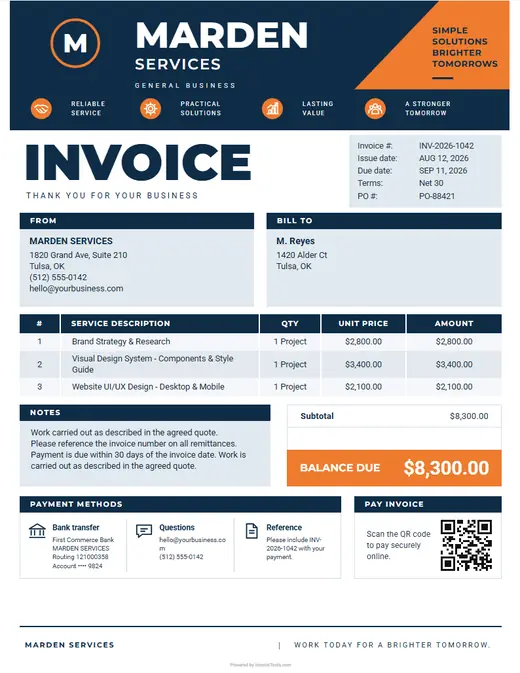
  • Specific service description. A plain description of what you did, in place of the words services rendered, because a vague line is the one an accounts team sends back.
  • Goods and materials. Products or supplies sold, with quantity and unit price, kept on their own lines so sales tax is applied only where it is due.
  • Hours and hourly rate. Hours worked and the rate as two separate figures, so the customer can check the total against the time they know you spent.
  • Reimbursable expenses. Costs paid for the customer, such as permits, shipping or parking, at the receipt total on their own line rather than hidden in your rate.
  • Sales tax by line. Tax applied to the taxable lines only, with the rate shown, since one invoice can carry both taxable goods and untaxed services.
  • Customer PO number. The purchase order or job reference a business customer gave you, since many accounts payable teams cannot approve an invoice without it.
  • Deposits and prior payments. Any deposit or earlier payment shown as a deduction, so the balance due is the amount the customer actually still owes.
  • Business name and tax permit. Your legal business name and address, plus your sales tax permit number if you collect tax, so business customers can file the invoice correctly.

Made for the way small businesses work

  • The lines your work starts with

    Services rendered, materials, labor by the hour. Pick your trade and the invoice opens with lines you can edit rather than a blank page.

  • The detail that gets queried later

    Whatever your clients ask about three months on, put it on the invoice. That is the document they keep.

  • Show the work, get it signed

    A photo and a signature turn an invoice from a request into a record.

  • Paid from the document

    A card link and a QR on the invoice, so the person reading it can pay it.

  • Repeat work bills itself

    Anything you bill on a schedule can be set once and left to arrive on its own.

  • The quote becomes the invoice

    Priced first, billed after, from the same lines, so the figures match.