InvoiceTools
A web developer, seen from behind, works at a monitor with code on one side and a website design on the other

From code to launch

Free web design invoice and website estimate templatesKeep the build, scope and final invoice equally clear.

InvoiceTools gives web designers and developers simple calculators and templates to define scope, set a fair price, and send a professional invoice.

Get started

Clear projects. Confident invoices.

A clear path from first conversation to paid.

Turn your web project from an idea into a completed, paid invoice.

  1. Discovery

    Understand goals, audience and requirements.

  2. Build

    Design and develop the agreed solution.

  3. Revisions

    Incorporate feedback and make refinements.

  4. Invoice

    Send a clear, professional invoice.

  5. Receipt

    Get paid and close the project.

Website project scope

  • DiscoveryGoals, audience, requirements, references and technical considerations.
  • DesignPage layouts, responsive design, style guide and key templates.
  • DevelopmentFront-end and back-end development, integrations and testing.
  • Content handoffProvide final content and assets for implementation.
  • RevisionsIncluded rounds of revisions and any additional notes.

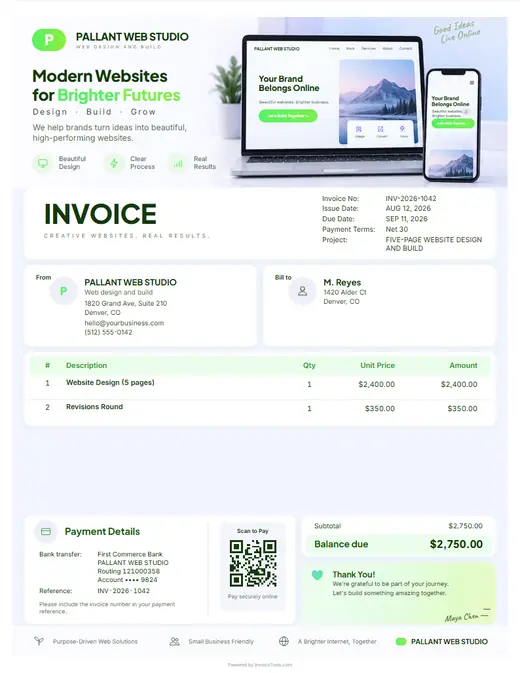
Illustrative example: a $2,400 "Design approval" milestone invoice, followed by a separate $150/month maintenance invoice that lists the $18/year domain renewal as its own pass-through line, apart from the maintenance fee. Sample rates only.

Start with a clear scope.

A well-defined scope keeps your project, your client and your final invoice on the same page. Use our sample scope to outline discovery, design, development, content handoff and revisions.

Use the scope template

Tools built for how you work.

Three simple calculators to help you price your work with confidence.

Professional templates, ready to use.

Customizable templates for key moments in your client work.

All 10 web designer invoice designs

Get paid, your way.

Put your own payment link on the invoice with one QR code and let your client choose their preferred method. It’s simple and flexible.

Add your own payment link

PayPal, a pasted Stripe link, Venmo, Cash App, Wise or bank transfer

InvoiceTools does not process or hold your money.

Hands typing on a laptop at a wooden desk beside a white mug

Less admin. More building.

Turn your next project
into a clear, professional invoice.

Join web designers and developers who keep their projects and payments simple.

Get started

Resources

What a web design invoice lists

  • DiscoveryWorkshops, research and the content audit
  • Sitemap and pagesHow many pages or templates, named
  • DesignPage templates and the revision rounds included
  • DevelopmentThe build, responsive layouts and content setup
  • Integrations noteForms, booking or payment tools the client already uses
  • TestingBrowsers, devices and forms checked before launch
  • Hosting and domain noteWho pays the provider, and for which period
  • Milestone and depositThe share due at each stage, and what was paid

Frequently asked questions

What should a web design invoice include?

Name the stage being billed and what was delivered at it, the number of pages and revision rounds, and extras such as copywriting or content migration. Third-party costs like hosting, domains and plugin licenses belong on their own lines with the period covered, and the handover terms should say when the client owns the site and its logins.

How much should I charge for discovery and wireframes?

It depends on how many pages and user flows the site needs, how many stakeholders join the workshops, whether you do user research or content planning, and how much of the brief the client has already written. The generator opens that line at $700.00 so the invoice is not blank; replace it with your own fee.

How do I invoice a deposit, the build and hosting?

The deposit is its own invoice against the accepted proposal. Design and build are billed by stage, each invoice naming what was approved, and hosting or maintenance is a recurring invoice on its own cycle, not a line buried in the build. Keeping them apart means a client who cancels hosting does not reopen the build fee.

When should the final web design payment be due?

Tie it to launch or to sign-off on staging, whichever comes first, so a client who delays going live does not delay paying for finished work. State in the proposal that the site goes live, or files are handed over, once the final invoice is paid. Milestone billing gives every stage a trigger and a due date.

What can I do if a web design client stops paying?

Your leverage is the handover: keep the site on your staging server, and hold admin logins, source files and the domain transfer until the balance clears, as long as your contract says so. Do not take down a live site without a clear contract term allowing it, as that can start a dispute of its own. Send a statement of what is owed, then a final notice.

Do web designers charge sales tax?

In many states web design services are not taxed, but some states tax them, some tax digital products or software, and a few tax hosting. Premium themes or plugins you resell can be taxed differently from your design time. The generator lets you set tax per line, so check your state, and the client's state if it differs.

How do I bill pages or features added mid-project?

Price them before you build them. Send a short change order with the added pages or features and the fee, get approval in writing, then add it as its own line on the next stage invoice. Per-page pricing makes this easy, because an extra page already has a rate on the original quote.

How do I split a website project into milestone invoices?

Write the schedule into the estimate: a share of the total due on signing, on design approval, on staging and on launch, each tied to something the client can see. Then send one invoice per milestone that names the stage, what was delivered and what has been paid so far.

How much deposit should a web designer ask for?

Whatever your proposal states and the client signs. Many studios take a share up front so discovery and wireframes are covered if the project stops. Invoice it as its own document and send a receipt when it clears.

How do I bill a monthly website support plan?

As its own recurring invoice, separate from the build. Name the month covered, what the plan includes (updates, backups, a set number of edit hours) and the hourly rate for anything beyond it, so small requests do not become free work.

What is a statement of work, and does it go on the invoice?

A statement of work is your written scope: pages, features, rounds, what is excluded and the milestone schedule. You write it and keep it with the proposal; put its reference and a one-line summary on each invoice so the client's accounts team can match it.

Who pays for hosting, the domain and plugin licenses?

The client, in most cases. Either they pay the provider directly, or you list the cost on its own line with the period it covers. Renewals then land with the owner of the site, not with you.

What to include in a web design invoice

  • Project stage billed. Deposit, design approval or launch named on the invoice, with the share of the total fee it represents and what was delivered.
  • Pages and templates. The number of pages or templates designed and built, so adding pages later is visibly a change in scope.
  • Revision rounds. The rounds included in the fee and any extra rounds billed, which keeps late design changes from becoming free work.
  • Hosting, domain and licenses. Hosting, domain renewal, premium theme or plugin licenses and fonts passed through with the period each covers, so renewals are not a surprise.
  • Maintenance or support plan. Monthly updates, backups and small edits as a recurring line, with the hours included and the rate for anything beyond them.
  • Content and extras. Copywriting, stock photos, SEO setup or data migration billed on separate lines when they were not in the original quote.
  • Ownership and handover. When site files, admin logins and code ownership pass to the client, usually on final payment, so the handover terms are in writing.
  • Project and site reference. The project name, staging or live URL, and your business name and tax details, so the client's team can match the invoice to the site.

Made for the way web designers work

  • The lines every build has

    Discovery and wireframes, design per page, development, hosting and support. Pick web design and they are listed.

  • Pages, rounds and what is excluded

    How many pages, how many revisions, and what is not included. On the invoice it is scope; in an email it is optimism.

  • Show the staging link, get it signed

    Sign off on staging, recorded alongside the fee, is what closes a build rather than leaving it open forever.

  • Deposit before the first wireframe

    A payment link on the deposit invoice so the project starts when it clears.

  • Support plans, planned once

    Monthly hosting and support at a fixed figure. Plan the run once with the recurring invoice planner, then send each invoice on its date.

  • The proposal becomes the invoice

    Scoped in the proposal, billed from the same lines, so the client recognizes every figure.